Atlasly Developments
Property and real estate development software: one record for every site.
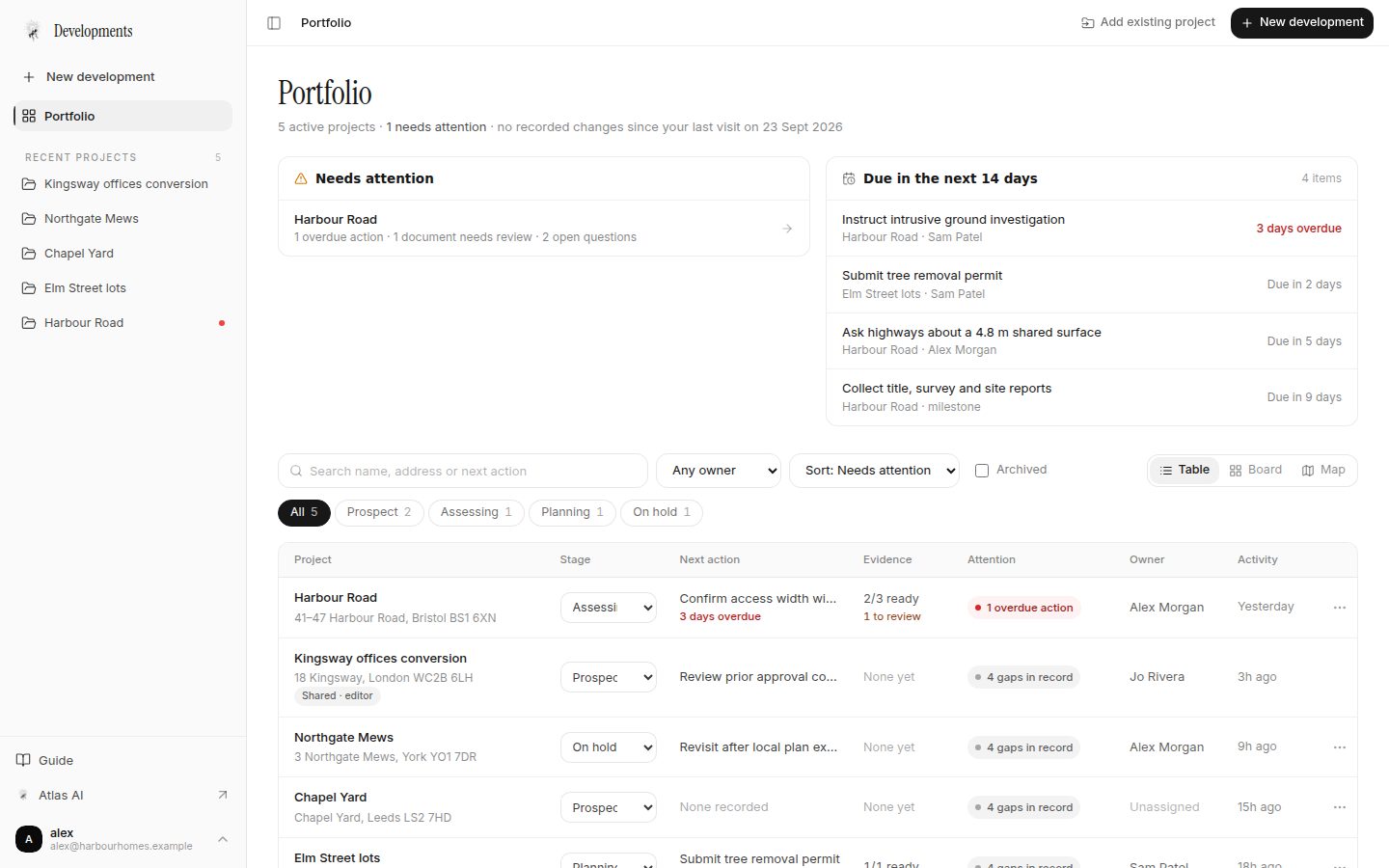
Atlasly Developments is development project software for property and real estate developers running several sites at once. Each site gets one record, from first look to investment committee, with the source of every figure in view.
- Parcels with title numbers, folios or APNs
- Due diligence documents with page citations
- Development options compared side by side
- Appraisal with profit on cost and on GDV
- Owned actions, milestones and reviews
- Project packs for committees and lenders
Uses your Atlasly account. Upload PDFs and email files today; Google and Microsoft connections are not available yet.
Who it is for
Built for development teams that carry sites from appraisal to delivery.
Developers and development managers
See the whole portfolio, what is overdue and what changed since you last looked, then open any project exactly where you left off.
Acquisitions and land teams
Record parcels with their title numbers or APNs, run site due diligence, compare options and test the numbers before an offer or investment committee.
Consultants and colleagues
Architects, planning and cost consultants join a project as viewers or editors and work from the same versions.
The problems it solves
Why development teams lose track of a site.
Evidence is scattered
Surveys in one drive, the pre-application reply in someone’s inbox, the vendor’s terms in another. Developments keeps each document and email with its version, sender and date, against the project and parcel it concerns.
Nobody is sure which version is current
Replacing a document keeps the earlier version readable. Options keep every revision. Packs record the exact versions they used and never change afterwards.
The numbers drift from the scheme
An appraisal prices one exact option revision. When the selected revision changes, the project says the appraisal is out of date instead of quietly mixing figures.
Assumptions look like facts
Findings are kept apart as facts cited to a page, assumptions, calculations and open questions. Appraisal inputs carry a source tag. Missing information is shown as not known.
How it fits together
Track every development site in one record.
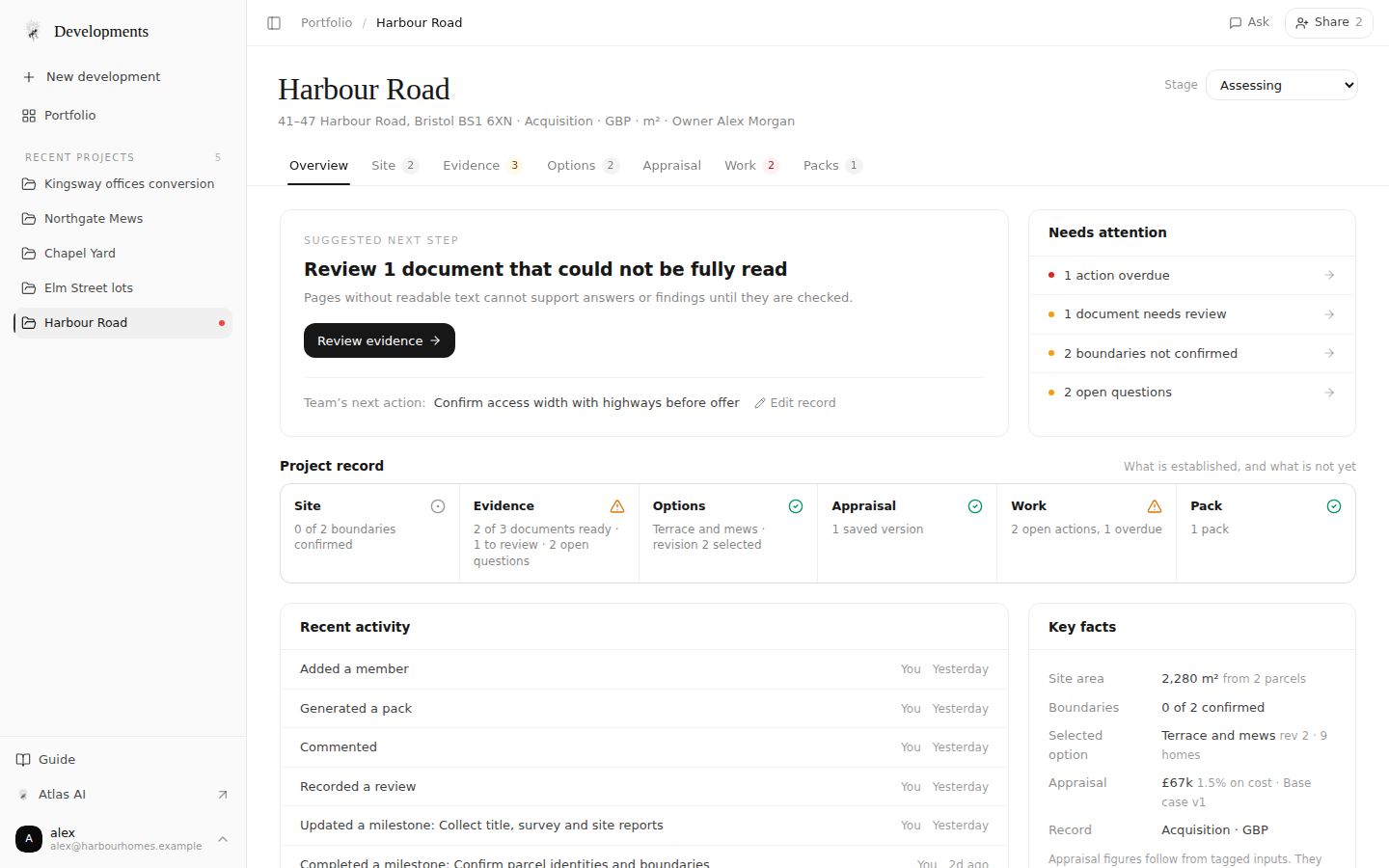
Each project opens on what to do next and how complete its record is: established, in progress, needing attention or not started.
01 · Site
Parcels with title numbers, folios and APNs
Record each parcel with its title number, folio or APN and draw or import its outline. A boundary stays unconfirmed until someone checks it against a source.
How it works02 · Evidence
Due diligence documents with page citations
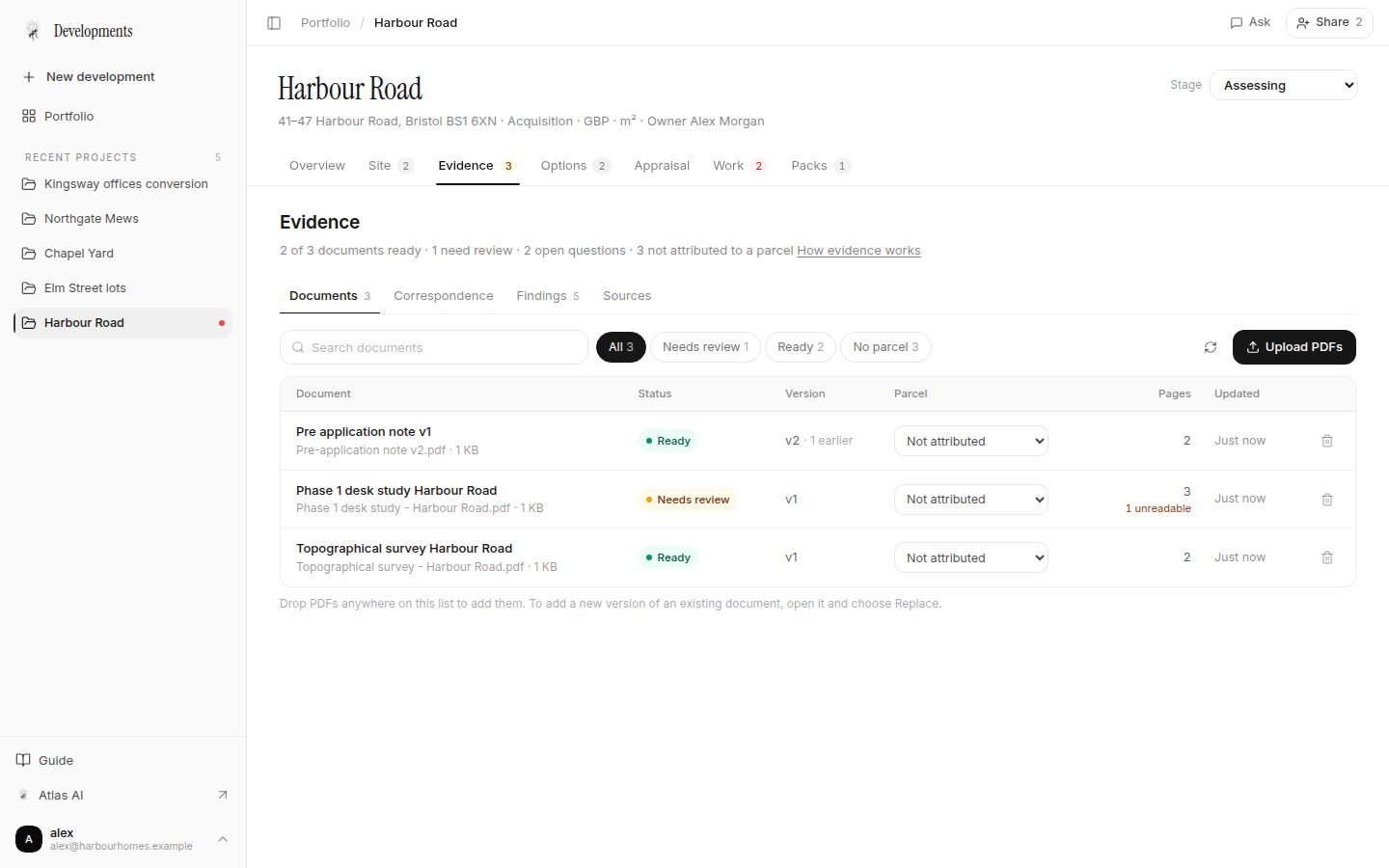
Upload PDFs and email files. Each document shows whether it could be read, keeps its versions and can be cited by page. Record facts, assumptions and open questions as you go.
How it works03 · Options
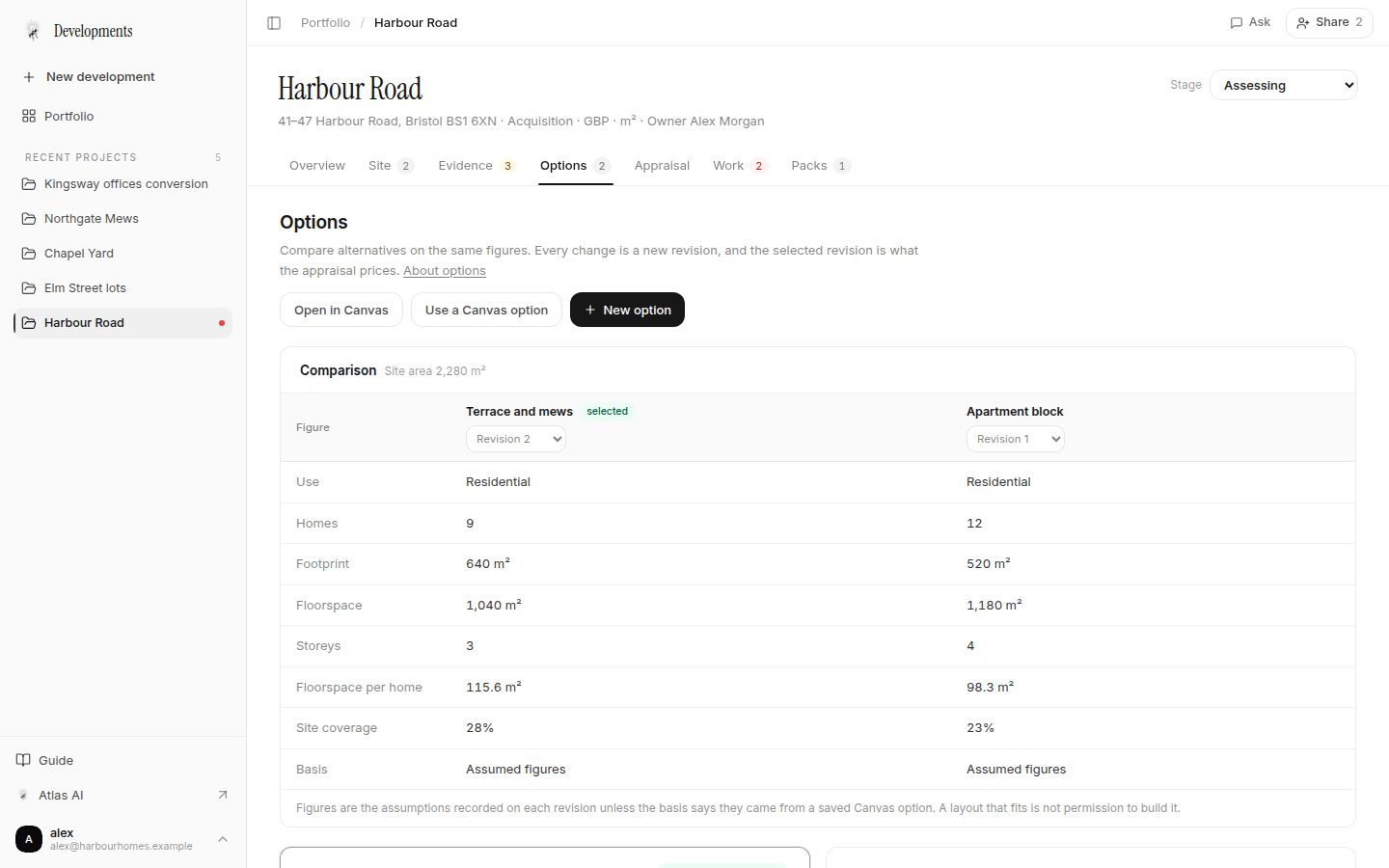
Development options compared side by side
Compare alternatives on the same figures — homes, footprint, floorspace, storeys, coverage — with the assumption behind each. Bring in saved Canvas options with their exact version.
How it works04 · Appraisal
Development appraisal: profit on cost and on GDV
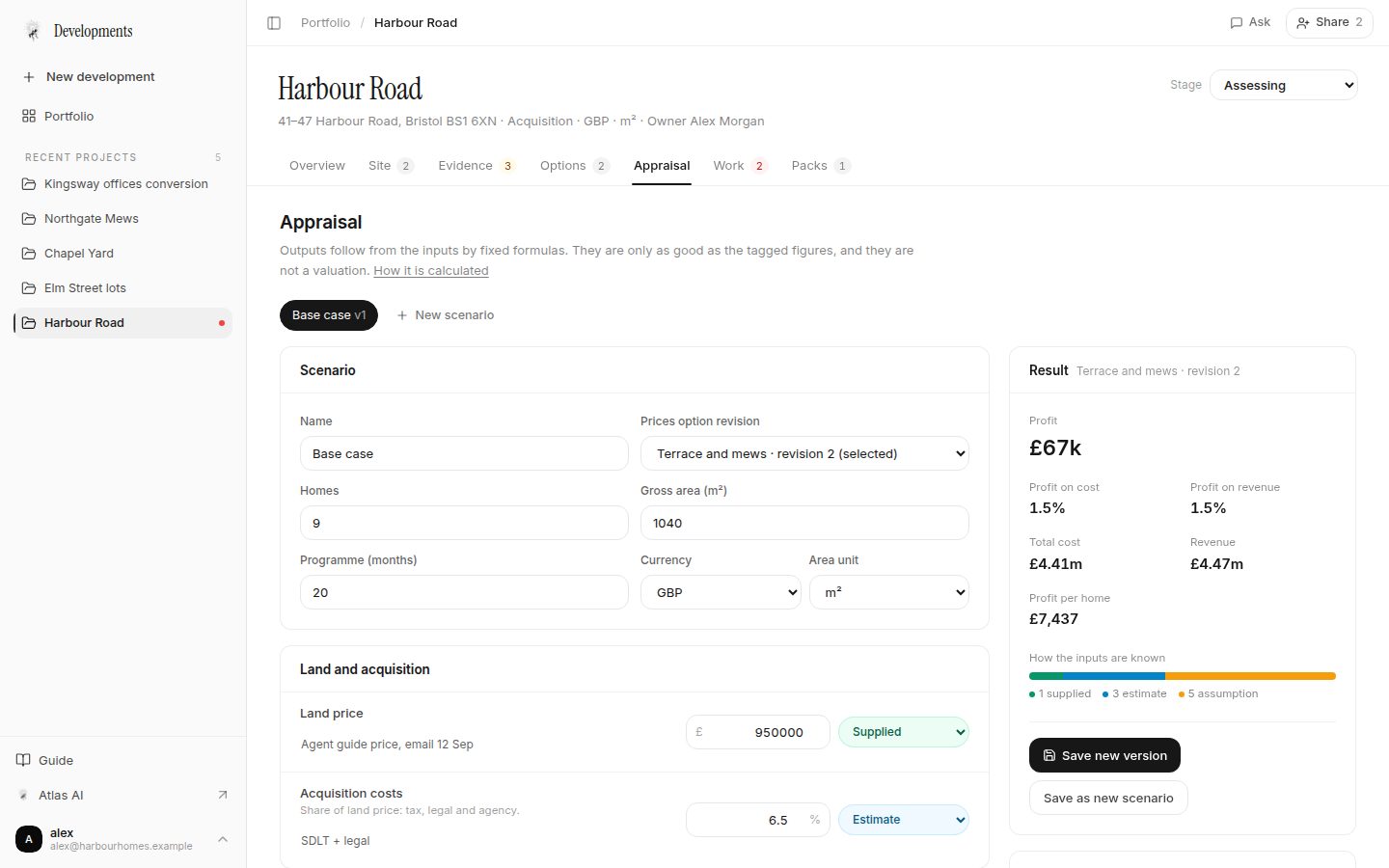
Test land, build, finance and sales figures for the selected revision. Profit, profit on cost, profit on GDV, the cost breakdown and sensitivity stay in view.
How it works05 · Work
Actions, milestones and reviews
Owned, dated actions that can wait on each other, milestones for the project stage, and reviews of the exact versions your team relies on.
How it works06 · Pack
Project packs for committees and lenders
Generate a readable pack of the current record with the versions it used. Print it or save it as a PDF for a committee, lender or consultant.
How it works
Your first project
Start with what you already have.
A site
Name the project, add the address and parcel references, then draw the boundary.
Documents
Upload the survey, reports and correspondence you hold. Unreadable pages are flagged, not guessed.
An Atlas AI project
Add an existing project. Its documents, findings and appraisals come with it.
Within the first session you can have the site recorded, the evidence organised with what is missing made explicit, the next actions assigned and a first pack ready to share.
Developments or Atlas AI?
Ask Atlas AI about a site. Run the project in Developments.
They share the same projects and evidence. Start in Atlas AI when you want answers about a place; add the project to Developments when it becomes something you are taking forward.
| Task | Atlas AI | Developments |
|---|---|---|
| Ask about any site: constraints, planning context, policy | In each project’s side panel | |
| Portfolio of projects by stage, owner and what needs attention | ||
| Parcels with separate references and boundary status | ||
| Document versions, readable status and page citations | ||
| Options with immutable revisions and comparison | ||
| Appraisal pinned to an exact option revision | Project appraisal | |
| Actions, milestones, reviews and members | Actions and members | |
| Project packs with a print view | Reports |
Already using Atlas AI? Add an existing project to Developments.
Scope
What Developments does not do.
Not a valuation
Appraisal outputs follow from your inputs by fixed formulas. They are not a Red Book or other formal valuation and say nothing about planning approval.
Not a cash-flow model
No dated cash flow, IRR or residual land value solve. Screen land value with the free residual land value calculator and keep your full model with your advisers.
Not construction management
No construction budgets, draws, invoices or cost control. Developments covers the site before and around the decision to build.
Screening land value? Try the residual land value calculator. Preparing to exchange? Work through the site due diligence checklist for developers.
What is available today
Available
- Development pipeline by stage, owner and work due, in table, board and map views
- Parcels with title numbers, folios, APNs or UPRNs, outlines and boundary confirmation
- PDF upload with versions, readable status and page citations
- Email file (.eml) import with sender, date and attachments listed
- Options, revisions and comparison; Canvas option import
- Development appraisal with profit on cost, profit on GDV, source tags and sensitivity
- Actions, milestones, reviews, comments and member roles
- Project packs with a print view and Markdown download
- GBP or USD, metric or imperial units
Not available yet
- Google Drive, Gmail, Microsoft 365 and Outlook connections (built; awaiting provider registration)
- Reading scanned pages without a text layer
- Invitation emails — you share the project link yourself
Status labels, risk bands and appraisal outputs come from fixed rules and formulas, never from the chat. Plans and usage are on the pricing page.
Questions
- What software do property developers use to track multiple sites?
- Many teams track sites across spreadsheets, shared drives and email. Atlasly Developments gives each site one record instead: its stage and owner, parcels, due diligence documents with page citations, development options, appraisal, actions and project packs, with a portfolio view of what needs attention and what is due across every site.
- Does it calculate residual land value, IRR or a cash flow?
- No. The Developments appraisal works out profit, profit on cost and profit on GDV from the land price and costs you enter, with sensitivity to sales, build cost, land price and programme. It has no dated cash flow, IRR or residual land value solve. For a quick land-side screen, use the free residual land value calculator, and keep a full cash-flow model with your advisers.
- Can I track UK title numbers and US APNs in one portfolio?
- Yes. Each parcel keeps its own reference (title number, folio, APN or UPRN) and boundary status, and each project records its currency (GBP or USD) and units (metric or imperial), so UK, Irish and US sites sit in the same portfolio.
- Can it produce a pack for an investment committee or lender?
- Yes. A project pack fixes the current record with the exact document versions, option revisions and appraisal versions it used, and states gaps rather than hiding them. Print it or save it as a PDF, or download it as Markdown.
- Does it replace Northspyre, Procore or ARGUS Developer?
- No. Budget, draw and construction management tools such as Northspyre and Procore, and cash-flow appraisal tools such as ARGUS Developer, do different jobs. Developments is the pre-construction record of a site — evidence, options, a profit-based appraisal, decisions and packs — and can sit alongside them.
- Who is Atlasly Developments for?
- Property developers and development teams who manage several sites at once: acquisitions, development managers and land and planning leads. Architects, planning consultants and cost consultants can be invited to a project as viewers or editors.
- How is it different from Atlas AI?
- Atlas AI answers questions about a site: constraints, planning context, policy and feasibility. Developments is where you manage a project over time: its parcels, documents, options, appraisal, actions, team and packs. They share the same projects, so an Atlas AI project can be added to Developments without starting again.
- Can it connect to Google Drive, Gmail, Microsoft 365 or Outlook?
- Not yet. Those connections are built but are not available until Atlasly completes each provider’s registration. Today you can upload PDFs and import email files (.eml) exported from any mail app.
- Does the appraisal give a valuation?
- No. It is a deterministic development appraisal: every output follows from the figures you enter by fixed formulas, each figure is tagged as supplied, an estimate or an assumption, and missing inputs stay unknown rather than being filled in. It is not a valuation and says nothing about planning approval.
- How do colleagues get access?
- An owner or admin adds a colleague by the email they sign in with, as a viewer, editor or admin. The colleague needs to have signed in to Atlasly once. Atlasly does not send invitation emails; you share the project link yourself.
- Can it read scanned documents?
- Only PDFs with a text layer are read. Pages without readable text are flagged as needing review rather than guessed, and cannot support findings or answers until checked.
Set up your first development.
Only a name is needed to start. Everything else can be added as you learn it.